Table of content

How to Install Rewriter Plugin for WordPress

Jul 15, 2021 • 2 min read

The first step would be to…
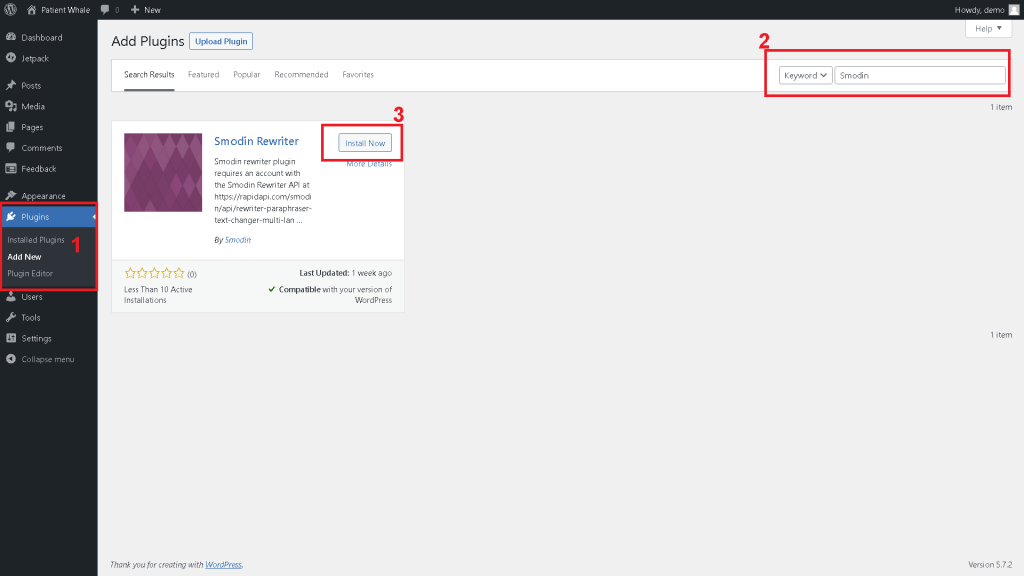
 

1- Go to Plugins, ->  Add New.

2- Search for the plugin “Smodin Rewriter”

3- Click on install and activate.
 

install smoding rewrite plugin for wordpress

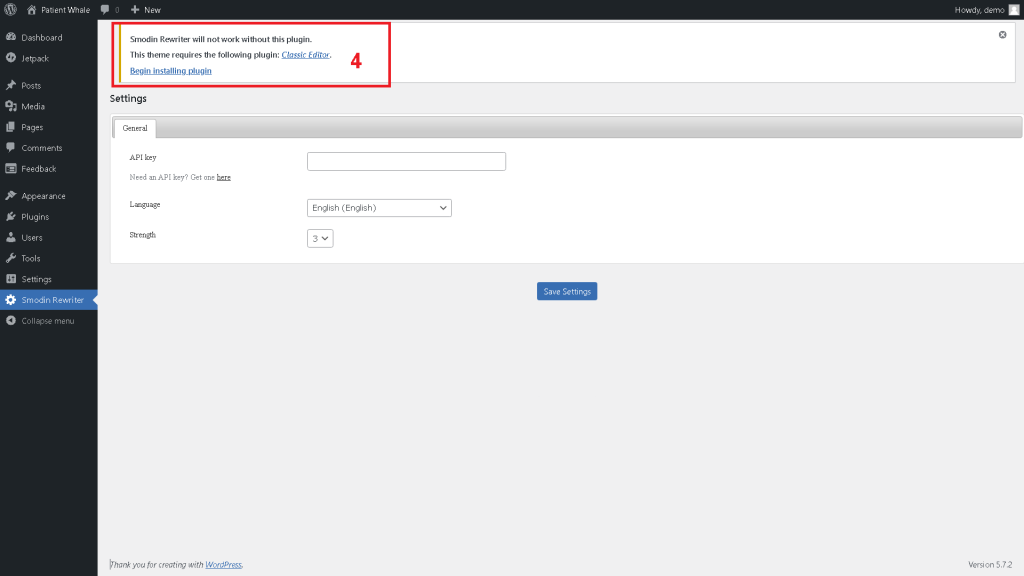
Once you click Install and activate, you will be redirected to the following page

4- Smodin needs the plugin “Classic Editor” to work, if you don’t already have it, click begin installing the plugin
smodin rewriter wordpress plugin

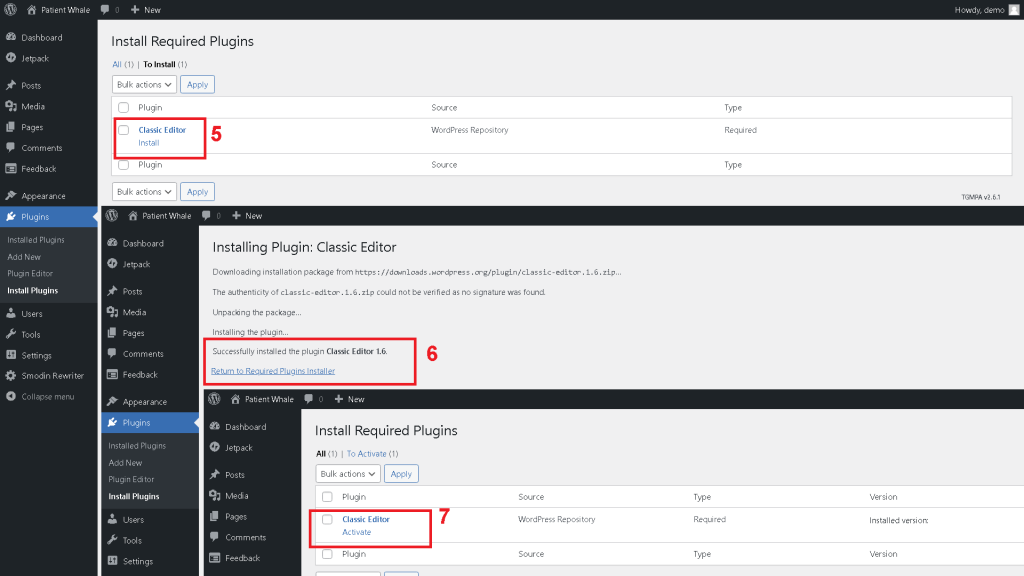
Once you click “Being install plugin”, you will be redirected to a new page, and it will redirect you again each time

5- Click Install classic editor
6- Once the installation is successful, click “Return to required plugins installer”
7- Click on “Activate” classic editor
smodin wordpress plugin

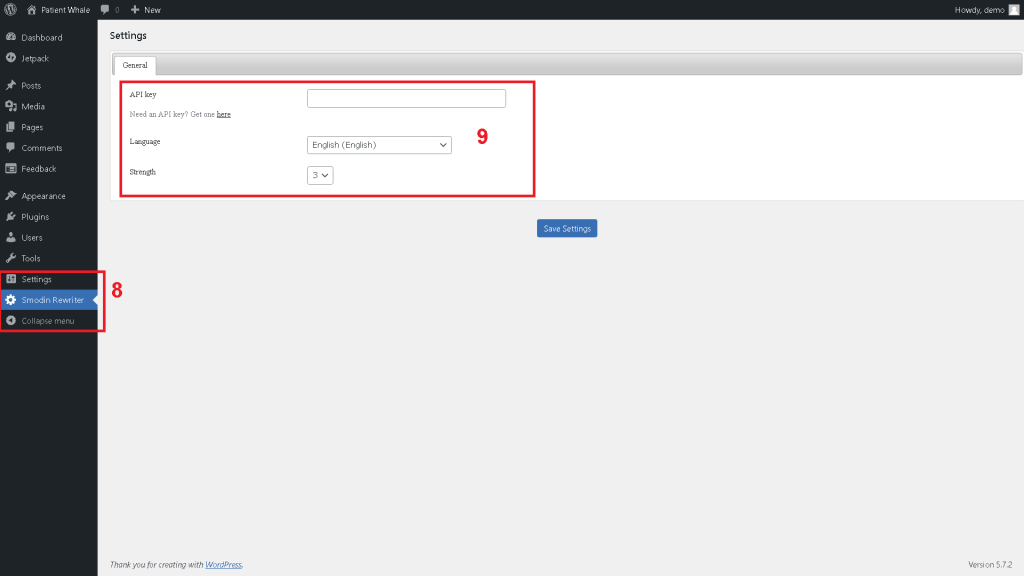
8- Click on Smodin Rewriter settings
9- Add your API Key, select the language and the strength you want for the rewriter

Don’t have an API key? you can get one HERE  you will get an “X-RapidAPI-Key”, you simply have to copy-paste it on step 9
 

smodin rewrite plugin

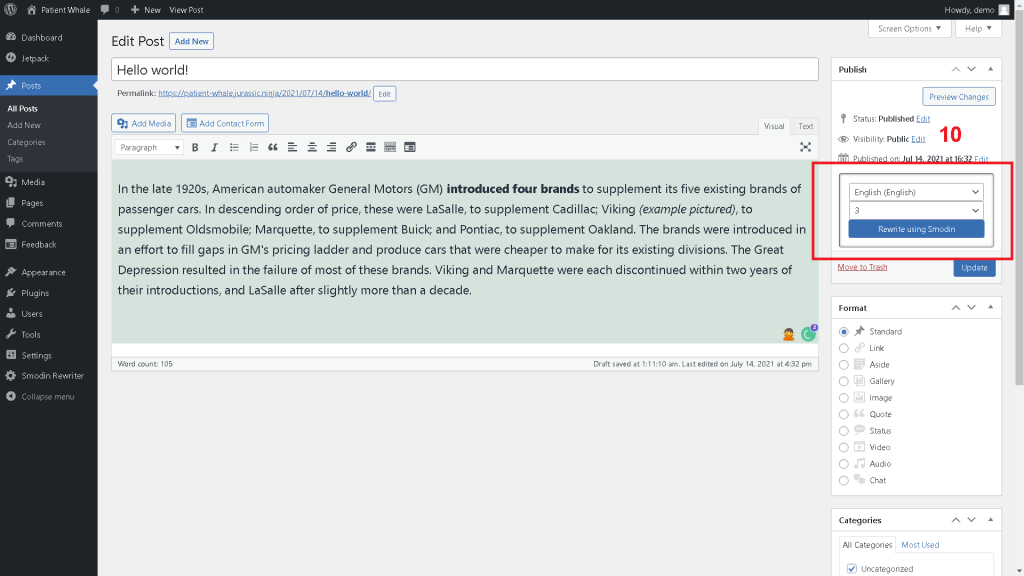
10- Go to add a post, or edit an existing one, select the language you want, click on Rewrite, and it’s done!

You’ve installed Smodin’s rewriter plugin for WordPress Successfully

Congratulations on installing your rewriter plugin. If you have further concerns about the installation process, or if you encounter any problems with the plugin while you use it, please let us know. We’re more than glad to fix it for you. So get in touch with us today.


AI Tools

Popular AI Tools

Free AI Rewriter
Try now
AI Plagiarism Checker
Try now
AI Content Detection Remover
Try now

BLOGS

Staff picks

Most Read Articles

General

A first look at Apple’s redesigned Mac Mini and its other new Macs

What do professors use to detect AI? There is ongoing discussion about the best way to tackle plagiarism among students.…

Author Image
Tarun Sharma November 21, 2024

How To

Managing Smodin Addons

If you already have an account, and you would like to add or remove any of the addons Smodin has…

Author Image
Smodin Editorial Team November 11, 2021

General, How To, student, Writting

How to Write a Conclusion Paragraph

You have done it; you have perfected your introduction in the article or essay. You have spent time examining and…

Author Image
Smodin Editorial Team October 29, 2021

Writting

How to Write a Good Thesis Introduction?

Crafting a compelling thesis introduction can be a daunting task, but with our comprehensive guide, the process is made simpler.…

Ready to go?
Protect Your Content with Smodin's AI Checker Tool

Ready to ensure your content stays authentic and AI-free? Don't risk your hard work being mistaken for AI-generated text. Sign up with Smodin today to access our AI content detector and enjoy high accuracy, real-time analysis, and multi-language support. Plus, unlock even more advanced tools to safeguard and enhance your work!