
Smodin Chrome Extension
AI Writing Assistant for
AI Detection and Humanization
AI Writing Assistant for
AI Detection and Humanization
Powerful Features of the Smodin Chrome Extension
Smodin is your all-in-one writing assistant in Chrome. All the features from the website are now right at your fingertips.
💪 AI Detection and Sentence Analysis
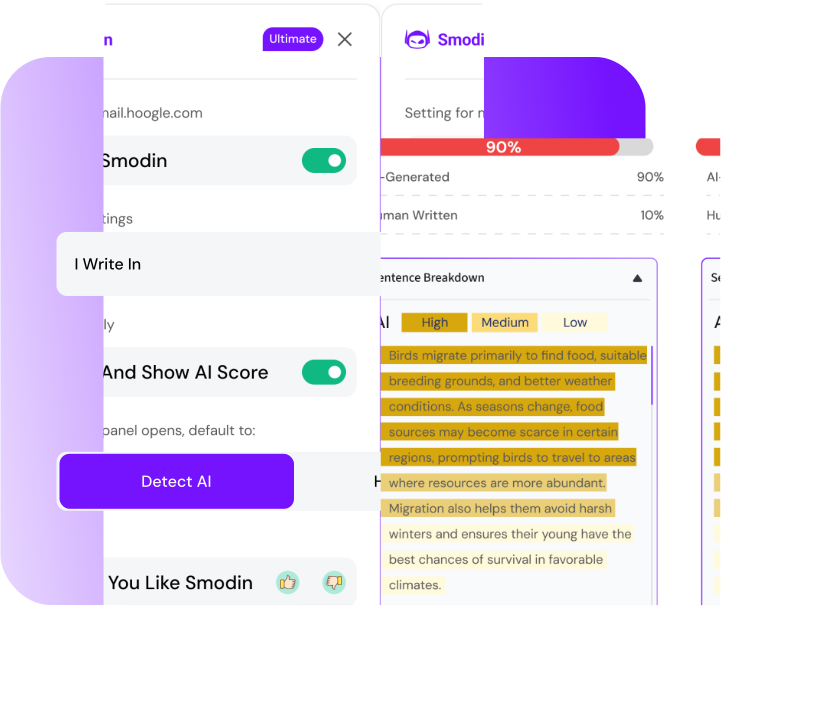
Want to know if your text was written with AI? Smodin will show you exactly that and highlight any spots that might be AI. It's extremely easy to distinguish machine-style writing from natural writing.
✍️ Humanize With One Click
Text sounding boring or robotic? One click and it's lively, clear, and easy to read. Perfect for emails, posts, or any notes.
🗣 Multi-Language Support
Working in more than one language? No problem! Smodin supports over 50 languages, so you can write, translate, and edit quickly and easily.
➡️ Easy-To-Use Side Panel + Shortcuts
Open the side panel and use quick commands for all main menus: AI Detection with Sentence Analysis and Humanization with changes shown.
How To Use the Smodin Chrome Extension
Getting started with the Smodin extension for Chrome is fast and easy. You download it straight from the Chrome Web Store, and setup takes just about a minute.
Step 1: Install From the Chrome Web Store
Head to the Chrome Web Store, find Smodin, and click Install. The extension downloads in seconds, and you'll see its icon appear in your toolbar.
Step 2: Pin Smodin To Your Browser Toolbar
To keep Smodin easily accessible, pin it to your Chrome toolbar. Click the puzzle-piece icon in Chrome, then click the pin icon next to Smodin. This way, it's always visible and ready to use.
Step 3: Log In With Your Smodin Account
Open the extension and log in using your Smodin account with Google or email. If you don't have one, signing up takes only a few clicks. Once you're logged in, you can save your settings, access premium features, and keep your work synced across multiple devices.
Step 4: Highlight Text or Open the Side Panel
Highlight the text or part you want to improve and use any feature. Alternatively, you can open the side panel and select the tools you need for text fixing.
Step 5: Detect, Humanize, or Rewrite in One Click
Choose what you want to do – spot AI-generated content, make it sound more natural, or give a complete rewrite. Results appear instantly, allowing you to save time, work comfortably, and achieve professional-quality results without leaving your workspace.
Why Millions Trust Smodin
Millions of people use Smodin every day for studying, work, and creative projects.
⭐ Trusted by Students, Professionals & Educators Worldwide
Over 10 million students, writers, and professionals rely on Smodin to revise, rewrite, and improve their content every day.
🎯 Reliable AI Detection With Industry-Leading Accuracy
Check your text with confidence. Smodin's AI detection is accurate and helps you quickly spot any AI-generated content, so your work stays original.
🎓 Endorsed by Universities and Businesses Around the World
Universities, schools, and thousands of businesses rely on Smodin to create, check, and improve content every day. It's a trusted tool for education and professional work alike.
✅ Privacy-First: Your Text Stays Yours
Smodin follows strict data privacy rules, never sells your data, and always lets you control what you upload and store.
Want to write 10x faster and make your text sound natural and professional? Install the Smodin Chrome Extension today and use all the same powerful features from the website right in your browser without switching tabs.
Premium Package - Get Full Access starting at $19.99/month*
With this tool, you can access all the powerful features from our website directly in your browser, eliminating the need to switch tabs.
Full access to
Frequently Asked Questions
Do you have any questions about our Chrome Extension? Check out these FAQs to learn more about our AI-powered tool.
How do I install the extension?
Go to the Chrome Web Store, find Smodin, and click Install. It only takes a few seconds.
Do I need an account to use the extension?
Yes, you need a Smodin account to access all features. Signing up is quick and free.
Is it free to use?
Yes, the extension offers free features, with optional premium upgrades for extra tools.
Does the extension work on all websites?
Yes, it works on all websites with text fields, so you can improve content almost anywhere online.
Where can I use the extension?
You can use it on Google Docs, Gmail, social media platforms, emails, and any website where you write.
Can I humanize any text online?
Absolutely. You can humanize any text as soon as you select it in your browser.
How accurate is Smodin's AI detection?
Smodin identifies AI-generated text with 98% accuracy, so you can create original content.
What languages are supported?
Smodin supports English, Chinese, Japanese, French, Arabic, and more than 50 other languages.
What's the difference between the Chrome extension and the Smodin web app?
The Chrome extension gives you all the main tools directly in your browser, so you can work anywhere online without opening the site. While the Smodin web app has the same features, you use them by visiting smodin.io in your browser.
Is my data secure when using the extension?
Yes, Smodin never stores or sells your data. You stay in control of everything you upload.
Pricing & Plans
Monthly
Yearly (save 20%)
Currency
Full access to:
Full access to:
Need a bigger plan?
What's Included in Each Plan?
Rewriter
Effortlessly enhance your articles, blog posts, essays, or any text, maintaining original meaning.
Humanizer
Advanced recreation tool for transforming content while preserving meaning
AI Content Detector
Feel confident your text isn't detectable by AI with our 95% accurate AI content detector.
Grader
Grade your essay or assignment based on rubrics used in colleges across the world. AI Grading creates a standardized grading process for everyone, promoting equality in education.
Plagiarism Checker
Feel confident that your text is unique with our plagiarism checker.
Homework Solver
Get answer for any student homework questions across most subjects and languages.
Essay
Our AI Essay Writer crafts well-structured, descriptive, research, and argumentative essays for various topics, perfect for papers and articles.
Research Paper
Get research-quality content with citations up to 5000 words, suitable for assignments, blogs, technical subjects, and reviews.
Article
Article writer merges top articles into detailed paragraphs each sub-outline, ensuring quality content.
Author
Our model, trained on various prompts, assists in writing anything with context or commands, like outlining topics on autonomous cars.
Summarizer
Effortlessly enhance your articles, blog posts, essays, or any text, maintaining original meaning.
Chat
Elevate your conversations: Empower your chats with cutting-edge AI and Real-time Google Insights!
Translator
Translate your text into multiple languages at once, with over 100 languages to choose from
Custom AI
The custom AI streamlines writing by allowing users to create custom templates and automatically generate content based on them.
Not ready to subscribe?
Try the Chrome Extension free for 7 days.

© 2026 Smodin LLC
